Hackers’ Corner: Context Sensitive Help and COM in APL+Win
Vector 15:2, page 96
Transcribed from the printed issue; not yet reviewed. Read it in the PDF of the issue, page 96
Context sensitive help driven by Windows is a powerful refinement to any application. Indeed this is a hallmark of any ‘polished’ or ‘professional’ Windows application and should be considered integral to the design of applications. There are several Microsoft Word add-on packages which facilitate the production of the *.hlp file. A help facility based on a *.hlp file offers the following advantages:
- the *.hlp file is independent of the application itself. Provided that the topics are known, the *.hlp file compilation can be delegated to help authors: the application development and help file authoring can proceed concurrently.
- the *.hlp file can be written in such a way that it can also be printed as the user manual.
- the ‘annotate’ facility enables users to elaborate the content of the help topics within the *.hlp file itself.
By convention, context sensitive help is available on pressing F1: help on the context indicated by the position of the cursor is shown by WINHELP which then takes over, enabling selective browsing/printing/copying of the topics in the help file.
WINHELP "Displays Help for a particular topic identified by a context number that has been defined in the [MAP] section of the .HPJ file." (Windows 3.1 SDK)
Now, the provision of WINHELP driven help does not seem straightforward. The APL+Win manuals do not cover this at all. However, APL+Win provides the building blocks.
If an edit object has focus, the name of the object can be found as follows:
Note that the above expression yields the name of the edit object [works while the form on which the object appears in the Wait loop], not its context number. In fact APL+Win does not cater for a property which can contain the context number.
The APL+Win header file APLWADF.INI does not include the WinHelp call: that is, the ⎕wcall function cannot make sense of an application programming interface call as documented:
BOOL WinHelp(hwnd, lpszHelpFile, fuCommand, dwData)

HWND hwnd;              /* handle of window requesting help */

LPCSTR lpszHelpFile;    /* address of directory-path string */

UINT fuCommand;         /* type of help   */

DWORD dwData;           /* additional data      */
APL+Win will recognise the call to WinHelp if the following line is added to the APLW.INI file:
Now, ⎕wcall 'WinHelpIdx' {parameters} will be recognised. This still relies on the context number.
The following alternative line (courtesy of Dave Phillips, many thanks Dave) overcomes this problem:
Now, a line such as:
will display help on topic Form from the Windows Interface help file provided with APL+Win. Note that the topic itself rather than the context number is used.
The F1 facility can be added to an application as follows:
⎕wself←'form.Help' ⎕wi 'New' 'Menu'
⎕wi 'caption' '&Help'

⎕wself←'form.Help.Context' ⎕wi 'New' 'Menu'
⎕wi 'caption' ('&Context',⎕TCHT,'F1')
⎕wi 'shortcut' 112 0
⎕wi 'prompt' 'Context Sensitive Help'
⎕wi 'onClick' 'CSHELP'
where the function CSHELP identifies the context (focus) and calls WINHELP.
Alternatively, the help facility can be provided from a floating menu (available on right click) as follows:
⎕wself←'ROBOT' ⎕wi 'New' 'Menu'

⎕wself←'ROBOT.OPT1' ⎕wi 'New' 'Menu' ('caption' 'Context Help')
    ⎕wi 'onClick' 'CSHELP'
In fact both mechanisms can be deployed and since the help call is managed by the function CSHELP both will behave identically.
The function CSHELP is:
    ∇ CSHELP
[1]    0 0⍴⎕wcall 'WinHelpIdx' 0 'C:\SAMPLE\APPLIC.HLP'
'HELP_KEY' (('#'          ⎕wi 'focus') ⎕wi 'name')
    ∇
where C:\SAMPLE\APPLIC.HLP is the help file to use.
The help facility is now in place. What of the procedure for creating the help file itself? I can recommend HelpBreeze from SolutionSoft. It is time to search the WEB for further information on help compilers!
APL and the Component Object Model
APL+Win version 3.0 can act as an ActiveX server to Excel. As usual, the APL+Win Reference Manual provides the bare bones of this capability, on pages 4.43 to 4.46. I did not find this comprehensive enough to produce a quick working example.
However, in case you are interested in using this, the screen print below provides an example which illustrates this capability.
In this simple example, a range in an Excel Sheet is updated by running a macro, APLW, which calls APL+Win to load a workspace, run the function JOTDOTTIMES with the arguments supplied. By default, the taskbar does not show an APL+Win session.
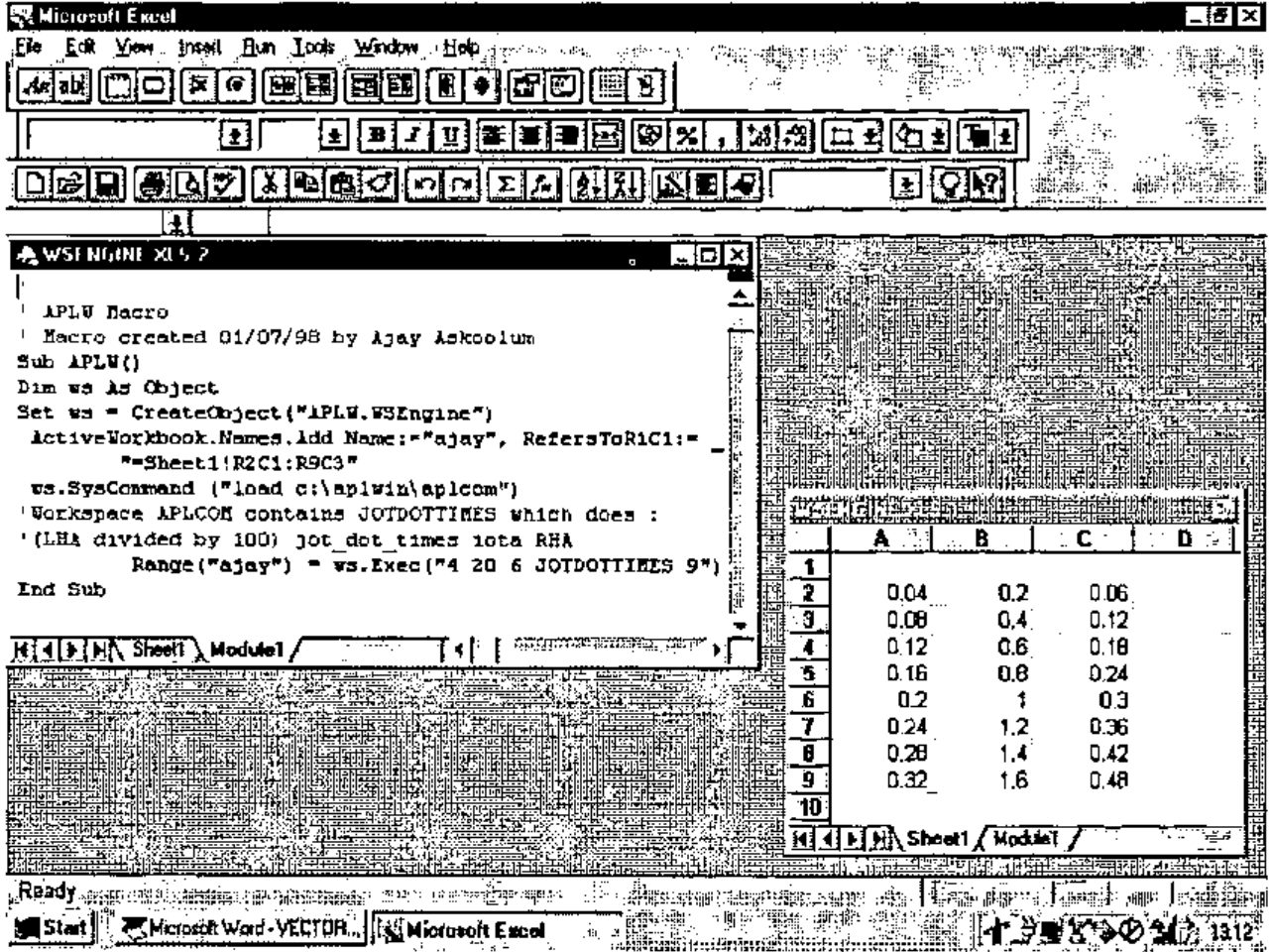
The function JOTDOTTIMES is :
    ∇ Z←L JOTDOTTIMES R
[1]   ⍝ Example of APL÷WIN acting as an ActiveX server to EXCEL 5.0
[2]   Z←(L×0.01)∘.×⍳⌊R
    ∇
Note that the appropriate registrations detailed in the manual must be carried out for this example to be reproduced. Also, note the implicit ⍉ of the result when it gets to Excel.